
TL;DR
- Use short, descriptive URLs that clearly explain the page topic.
- Keep a logical URL structure that reflects your site hierarchy.
- Include relevant keywords naturally in the URL slug.
- Use hyphens, lowercase letters, and avoid unnecessary parameters.
- Use 301 redirects when changing a URL to preserve SEO value.
- Make sure the URL matches the page content to improve user experience and search visibility.
Is a URL Just a Web Address? Not Quite.
A URL does more than point to a page. It tells users where they are, tells search engines what the page is about, and increasingly influences whether AI-powered answer tools like Google AI Overviews and ChatGPT choose to cite your content.
That’s why URL structure matters for SEO, for user experience, for rankings, and now for visibility in AI-generated answers. This post is your complete guide. It covers 11 best practices for SEO-friendly URL structures, with practical examples and updated guidance for 2026.
Let’s dive in.
What Is a URL? (And What Makes One “SEO-Friendly”?)
A URL (Uniform Resource Locator) is the address of a webpage on the internet. It is the link that searchers click to visit a specific page.
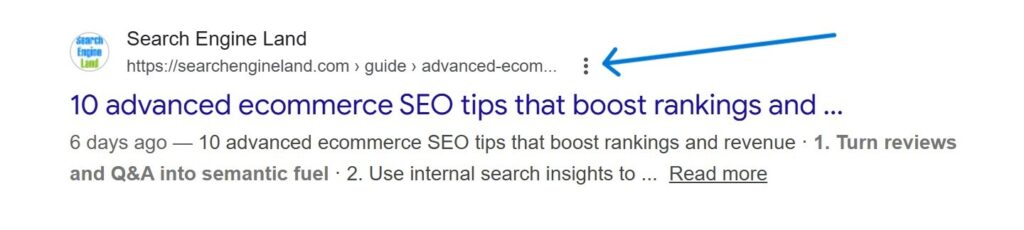
A URL can be broken down into 3 components (protocol, domain, and path):
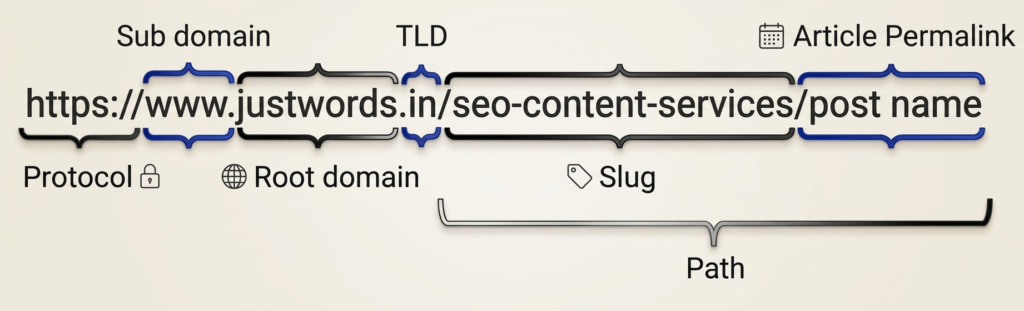
Breaking it down further:
- Protocol: The protocol (typically, https or http) tells the browser how to access the page. HTTPS is the secure version (more on this below).
- Domain: Made up of the subdomain, root domain, and TLD.
- Subdomain: For example, www stands for World Wide Web.
- Root domain: The root domain or second-level domain is the name of your website.
- TLD or Top Level Domain: There are many top-level domains, e.g.:
- Two letters indicate a country, such as “in” for India and “za” for South Africa.
- “.com” is for commercial websites, “.gov” is for government agencies or departments, etc.
- Path: The last part is the path providing directions to a specific page within your site.
- Slug: The last part of the path, identifying the specific page (e.g., seo-url-best-practices).
An SEO-friendly URL is one that is short, descriptive, and structured so that both users and search engines immediately understand what the page is about before even clicking.
At Justwords, we audit URLs as part of every SEO engagement. The issues we see most often? Slugs auto-generated from full titles, URLs with dates baked in, and no redirect strategy when content is restructured. That’s not how you should do it. Small fixes here consistently move the needle on rankings and CTR.
Why URL Structure Matters for SEO?
URL structure affects three things that directly impact your site’s performance:
1. User Experience (UX)
A clear, readable URL tells users exactly where they’re going. This builds trust, reduces hesitation, and improves click-through rates, especially in search results where your URL is visible before the click.
2. Search Engine Rankings
Google uses URLs as one of many signals to understand page content. Well-structured URLs are easier to crawl and index. They reinforce your keyword relevance and site hierarchy.
According to Google’s own documentation, URLs should use “simple, descriptive words… in a manner that is most intelligible to humans.”
3. Answer Engine Optimisation (AEO)
In 2026, AI-powered tools like Google AI Overviews, Bing Copilot, and ChatGPT Search regularly pull content from the web to generate answers. These systems assess whether a source is organised, trustworthy, and topically clear. A logical URL structure is one of the earliest signals they read. Poorly structured URLs can get your content passed over entirely.
Also Read : A Complete Checklist for On-Page SEO
URLs Across Different Website Types
The structure of URLs varies by site type, but the best practices are universal:
| Site Type | Typical URL Pattern | Example |
| Blog / Content | /category/post-name | /seo/url-structure-guide |
| E-commerce | /category/subcategory/product | /shoes/running/nike-pegasus |
| Services | /services/service-name | /services/technical-seo |
| Government / Edu | /department/topic | /resources/grants-2025 |
Whatever your site type, the practices below apply.
11 Best Practices for SEO-Friendly URL Structures
Here are 11 best practices for developing SEO-friendly URL structures.
1. Build a Logical, Purposeful URL Structure
Your URL structure is the skeleton of your website. Think about how your content is organised and make sure your URLs reflect that hierarchy.
Aim for a URL structure that is:
- Simple (no unnecessary folders or parameters)
- Logical (reflects where the page sits in your site hierarchy)
- Understandable (the words convey meaning), and
- Consistent (the same pattern applied across all pages)
Poor: https://example.com/p=1234
Good: https://example.com/seo/url-structure-best-practices
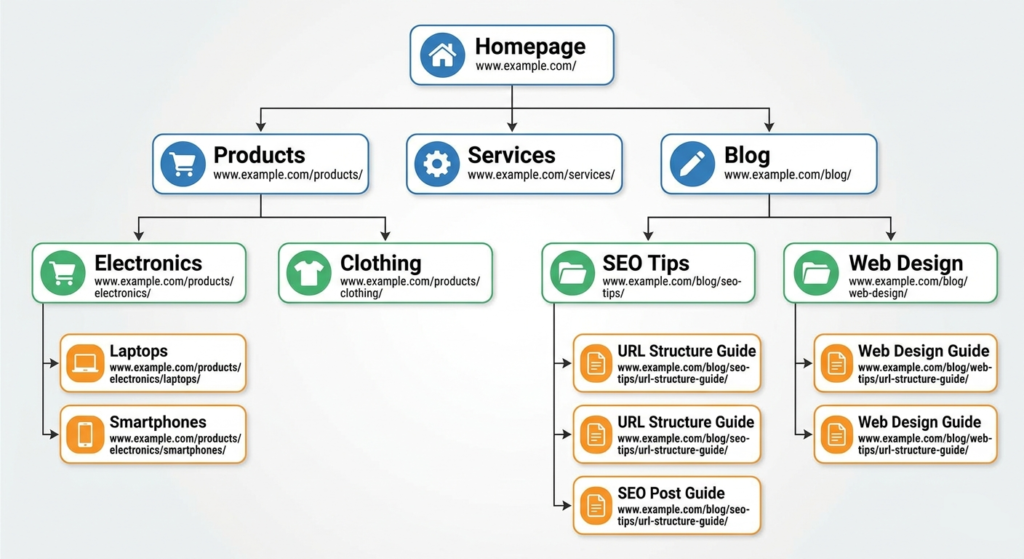
Think of it as a content map. Each level of the URL path should mean something: /services/ tells you it’s a services page; /seo/ tells you it’s in the SEO category. This logical nesting helps both users navigate and Google crawl efficiently.
From our experience, when we restructure a client’s URL hierarchy to reflect actual content categories, rather than how the CMS auto-organised things years ago, crawl efficiency improves noticeably within weeks, and we often see previously buried pages start to rank.
Also Read : How to Identify & Fix Keyword Cannibalization Issues?
2. Keep the URL Short and Straightforward
Shorter URLs perform better. They’re easier to read, easier to share, and less likely to get truncated in search results, which matters for CTR.
How short is short enough? Aim for under 75 characters. A 2025 Stan Ventures study found that click-through rates dropped by 15% when URLs exceeded 60 characters. Keeping URL slugs between 3–5 meaningful words (roughly 25–30 characters) is now the “gold standard” for maximising clicks. That said, don’t cut meaning to hit an arbitrary number. Clarity always beats brevity if you have to choose.
Too long: /blog/tips-and-techniques-for-preparing-the-perfect-seo-friendly-url-for-beginners
Just right: /blog/seo-url-best-practices
Strip out anything that doesn’t add meaning: session IDs, tracking parameters, redundant folder names, and filler words.
Pro Tip: Avoid including dates in slugs (e.g., /2025/04/seo-tips). Dates make URLs longer and create a problem when you update the content. The URL looks stale even if the content is fresh. Keep the date in your metadata, not your URL.
3. Include Your Target Keyword in the URL Naturally
Including one or two meaningful and relevant keywords in the URL is a good practice. This helps both users and search engines understand what the page is about, and gives a light but real ranking signal.
Avoid, however, practising “keyword stuffing” by adding too many keywords to the URL. Google may consider this spam, which will have the opposite effect you aim for.
Bad: /seo-url-seo-friendly-url-best-practices-seo-guide (keyword stuffing)
Bad: /article?id=892 (no signal)
Good: /seo/url-best-practices
For AEO: Descriptive, keyword-aligned URLs are more likely to be cited in AI-generated answers because they clearly signal topical relevance to the models crawling your content.
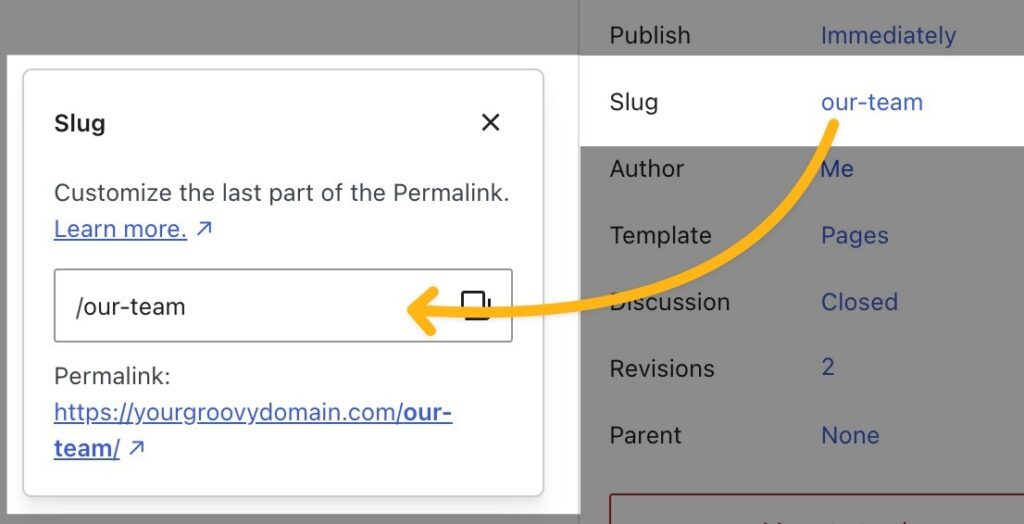
Most CMS platforms, like WordPress, allow you to customise your URL slug before publishing.
4. Separate Words by Hyphens
Use hyphens to separate words in the URL instead of spaces or underscores. This is critical because Google treats hyphens as word separators. Underscores are not treated as separators, meaning “seo_url_guide” is read as a single token rather than three words.
Separating the words also improves the UX, which determines whether people trust and click your link.
Correct: /seo-url-best-practices
Incorrect: /seo_url_best_practices
Never: /seo%20url%20best%20practices (space-encoded)
5. Always Use Lowercase Letters
URLs are case-sensitive on most servers (particularly Linux-based ones). This means “/SEO-URL-Guide” and “/seo-url-guide” can be treated as two different pages, which can create duplicate content issues and split your ranking signals.
The best practice is to use lowercase letters throughout.
Correct: /seo-url-best-practices
Problem: /SEO-URL-Best-Practices (may create a duplicate)
Inconsistent URL casing is a sign of poor technical hygiene. It’s the kind of thing Google’s Quality Raters notice when assessing how well a site is maintained, and it chips away at your trustworthiness score.
6. Prioritise HTTPS Security
HTTPS is the HTTP protocol that is enhanced with security. HTTPS has been a confirmed Google ranking signal since 2014. In 2026, it is non-negotiable.
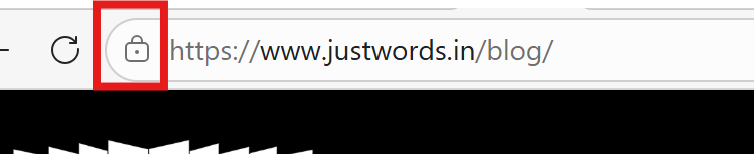
Sites still running on HTTP are flagged as “Not Secure” by Chrome and other modern browsers. That warning appears before the user even reads your content, killing trust and CTR on the spot.
HTTPS encrypts the connection between a user’s browser and your server via SSL/TLS, protecting data in transit. This matters not just for ranking but for user confidence, especially on any site that handles forms, logins, or payments.
Getting set up: Free SSL certificates are available via Let’s Encrypt. Most major hosting providers (Cloudflare, SiteGround, WP Engine) offer one-click HTTPS configuration.
7. Avoid Using Stop Words
The use of stop words like and, of, the, a, or, in, for, an, etc., is better avoided as they add length to a URL without adding meaning. It’s good practice for SEO-friendly URLs to eliminate stop words, making them shorter, cleaner, and faster to scan.
Before: /guide-to-the-best-practices-for-seo-friendly-urls
After: /seo-url-best-practices
Important caveat: Don’t blindly strip stop words if removing them changes the meaning or makes the URL confusing. The goal is clarity. If a stop word is doing real work in the phrase, keep it.
Note :Most SEO plugins (like Yoast for WordPress) will strip stop words from slugs automatically. Always review the auto-generated slug before publishing. It doesn’t always get it right.
8. Always Redirect Older URLs
As your website evolves, you may change the URL structure. In this situation, implementing a 301 (permanent) redirect is an SEO best practice. If somebody uses the old URL, they will automatically be taken to the new URL.
Whether you’re restructuring the site, consolidating content, or rebranding, redirects ensure you eliminate broken links that affect both users and search engines.
A 301 redirect tells search engines that the page has moved permanently. It transfers the vast majority of the old page’s link equity to the new URL and ensures users who click old links don’t land on a 404 error.
If duplicate URLs must remain accessible (for example, filtered product pages), use a canonical tag instead of a redirect to indicate the preferred version.
What to avoid in 2026? Redirect chains: A redirect chain is when users go from A → B → C instead of A → C. Each hop slows down page loading, dilutes link equity, and wastes crawl budget. Always redirect directly to the final destination.
In our practice as a digital marketing agency, we always maintain a redirect map for client sites – a simple spreadsheet that tracks old URLs, new URLs, and the date of change. When we start working on a site that’s had multiple redesigns with no redirect strategy, it’s common to find hundreds of 404s still receiving backlinks. That’s ranking power going to waste.
A well-maintained site with no broken links signals active and responsible content management is a key indicator of authoritativeness and trustworthiness.
Also Read : Website Migration SEO Checklist: How to Prevent Traffic Loss
9. Handle Numbers with Judgment
There’s no universal rule for numbers in URLs, but these guidelines work well:
- Use numerals for years: “/seo-url-guide-2025” is cleaner than “/seo-url-guide-two-thousand-and-twenty-five” and the year helps signal freshness.
- Use numerals for list counts: “/11-url-best-practices” reads better than “/eleven-url-best-practices”.
- For other numbers: Use judgment based on what’s most readable.
One watch-out for years in URLs: If you include a year, make sure you actually update the content. A URL with a year baked in that hasn’t been refreshed can signal staleness to both users and crawlers. If you need to update the content every year, avoid including it in the URL altogether.
Pro Tip: Freshness signals matter more than ever as AI tools try to surface current, accurate information. Updating content annually (and reflecting that in your metadata, even if not in the URL) can increase your chances of being cited in AI-generated answers.
10. Don’t Display the www Prefix
Displaying the www prefix has become unnecessary, and it is better to hide it. If you hide the www prefix, the URL will be shorter and cleaner, both of which are positive signals.
More important: Whichever version you choose (www or non-www), pick one and make it canonical. Set up a permanent redirect from the other version. Running both simultaneously creates duplicate content issues that split your ranking signals.
Check which version Google has indexed as your canonical domain in Google Search Console > Settings > Crawling. Then make sure all internal links, sitemaps, and rel=canonical tags consistently reference that version.
11. Ensure the URL Reflects the Page Content
Your URL is a promise to the user. If someone clicks “/best-seo-url-practices” and lands on a vague article about digital marketing, that’s a broken promise and a relevance mismatch that Google notices.
URL-to-content alignment is a genuine EEAT signal. It tells Google that your site is organised, intentional, and genuinely trying to serve user needs. It also directly impacts CTR: users scan URLs in search results before clicking, and a URL that matches what they’re looking for gets more clicks.
AI answer tools also assess whether the URL, page title, and content all align around the same topic. Mismatches are a red flag that can get your content deprioritised in AI-generated responses, even if the content itself is good.
Practical check: Read your URL out loud. Does it accurately describe what’s on the page? If not, fix the URL (with a redirect) or reconsider the content.
Quick-Reference: The SEO-Friendly URL Checklist
Before publishing any page, run through this:
- Is the URL short and under ~75 characters?
- Does it include a natural target keyword?
- Are words separated by hyphens?
- Is everything in lowercase?
- Is the site on HTTPS?
- Are stop words removed (without losing meaning)?
- Does the slug accurately describe the page content?
- Does it align with your site’s URL hierarchy?
- If it’s a changed URL, is there a 301 redirect from the old one?
- Is the URL consistent with your H1, title tag, and meta description?
What to Avoid: Common URL Mistakes That Hurt SEO
Even well-intentioned sites make these errors:
- Auto-generated slugs from titles: Most CMSs auto-generate slugs from your draft title. These are often too long and full of stop words. Always customise the slug before publishing.
- Dates in URLs: Unless timeliness is core to your content strategy (e.g., news, annual reports), don’t include dates in slugs. They make URLs longer and create a maintenance headache when you update the content.
- Dynamic parameters in public URLs: URLs like “/page?id=892&sort=desc&filter=new” are hard to read and hard for crawlers to interpret. Use clean paths with parameters managed via cookies or canonical tags.
- Too many subfolders: “/services/seo/technical/on-page/url-structure” is too deep. Keep it to one or two folder levels where possible.
- Inconsistent structure across the site: If blog posts use “/blog/post-name” but some old pages still use “/post-name”, that’s a structural inconsistency that complicates crawling and confuses users.
SEO-Friendly URL Examples: Good vs. Bad
| Page Type | Poor URL | SEO-Friendly URL |
| Blog post | /p=4521 | /blog/seo-url-best-practices |
| Service page | /services?id=12&cat=seo | /services/technical-seo |
| Product page | /product/00291-XL-blue | /shoes/running/nike-pegasus-41 |
| Category page | /cat=shoes&sub=running | /shoes/running |
| About page | /about-us-page-who-we-are | /about |
Recommended Tools for URL Auditing
Once you’ve applied these best practices, audit your existing URLs to catch issues at scale:
- Screaming Frog: Crawl your entire site and flag URL length issues, redirect chains, and 404s.
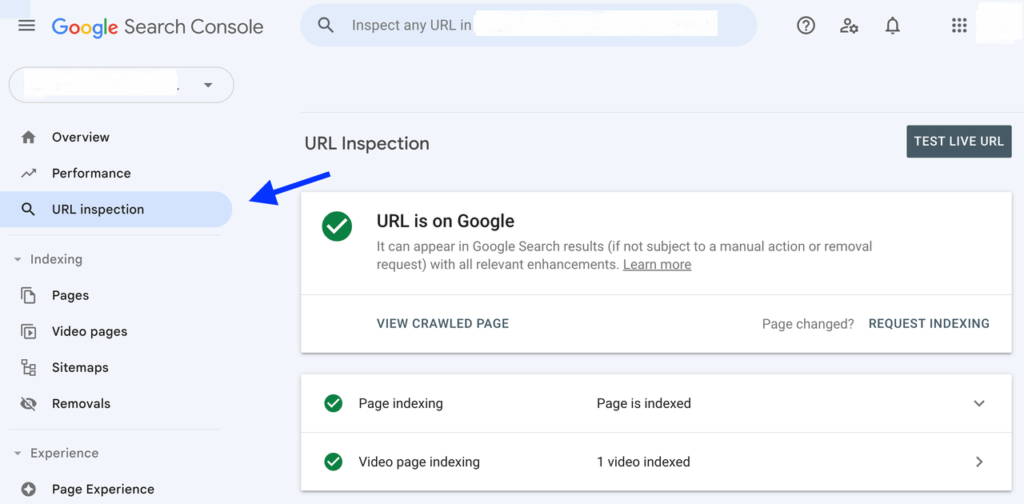
- Google Search Console: Identifies crawl errors, indexing issues, and your canonical domain.
- Ahrefs / Semrush: Track lost backlinks from changed URLs and analyse redirect health.
- Yoast SEO (WordPress): Helps manage slugs, canonical tags, and stop word removal at the content level.
Conclusion
We have covered 11 best practices for creating SEO-friendly URLs, from building a logical structure and choosing the right slug to handling redirects, HTTPS, and staying visible in AI-powered search.
These practices aren’t just technical hygiene. They directly impact how users experience your site, how Google ranks your pages, and how AI tools decide whether to cite your content.
The good news: most of these fixes are fast to implement and start showing results quickly.
The Justwords team has SEO professionals ready to help. Whether you’re building a URL strategy from scratch or auditing an existing site, contact us today, and we’ll be your partner.
Further Reading: How to Win at SEO in 2026: Future‑Proofing Your Strategy
FAQs
An SEO-friendly URL is a clear and descriptive web address that helps both users and search engines understand what a page is about. Good SEO URLs are short, include relevant keywords, and follow a logical structure that improves both user experience and search engine optimisation.
URL structure matters for SEO because it helps search engines crawl and index pages more efficiently. A well-structured URL also tells users what the page contains before they click it in search results. When URLs are simple and descriptive, they improve search visibility, user experience, and click-through rates.
Shorter URLs generally perform better in search. Most SEO experts recommend keeping a URL under 60–75 characters and limiting the slug to 3–5 words. Short URLs are easier for users to read and make it easier for search engines to crawl and understand the page topic.
Yes. Including keywords in your URL helps search engines understand what the page is about. However, keywords should be used naturally. Avoid keyword stuffing, as overly optimised URLs can appear spammy and may harm SEO performance.
Dynamic URLs (such as /page?id=123&sort=desc) are not automatically bad for SEO, but they are harder for users and search engines to read. Whenever possible, use clean, descriptive URLs instead of complex parameters. Clean URLs make it easier for search engines to crawl and index content.
URLs are a minor ranking signal in search engine optimisation, but they still matter. A clear URL structure helps search engines identify concepts within the URL and understand the relationship between pages on your site. Well-structured URLs can indirectly improve rankings by improving crawlability and user experience.