
Keyword cannibalisation in SEO happens when two or more pages on the same website target the same keyword and the same search intent, so they end up competing against each other in the search results. To fix it, find the competing pages, choose the one that should rank, and then merge, redirect, differentiate, canonicalise or remove the rest.
It becomes a real problem when your pages swap places in the search results, the wrong page ranks, or none of them climbs as high as one strong page could. This guide covers how to tell the difference, how to find cannibalisation, and how to fix it, including on WordPress.
Key Takeaways
- Keyword cannibalisation happens when two or more pages on your site target the same keyword and the same search intent, so they compete with each other instead of with your rivals.
- Cannibalisation isn’t a penalty by Google. Pages ranking for the same query aren’t automatically a problem, but they are a missed opportunity. The warning signs are URLs swapping places, the wrong page ranking, and rankings that won’t improve.
- To find it, use Google Search Console first, then use a tool such as Semrush or Ahrefs, plus a crawl for duplicate titles.
- To fix it, pick one primary page, then merge and redirect, differentiate, canonicalise, noindex or delete the others.
- On WordPress, plugins like Yoast and Rank Math can warn you about reused focus keywords, and they handle redirects, canonicals and noindex.
- Prevent cannibalisation with a keyword-to-URL map and a quick check before publishing anything new.
What Is Keyword Cannibalisation in SEO?
Keyword cannibalisation is when two or more pages on your website unintentionally target the same set of keywords. Instead of one strong page ranking in search results, you get several weaker ones, which means traffic, clicks, links and conversions get split between them.
Here’s an example from our own world. Say your site has a general “SEO services” page and another page for “SEO services in Delhi”. If both are optimised around the same keywords, such as SEO services, SEO agency, SEO services in Delhi and best SEO services in Delhi NCR, the two pages can end up eating into each other’s traffic. The pages may have different purposes and even different audiences, but search engines see the overlap.
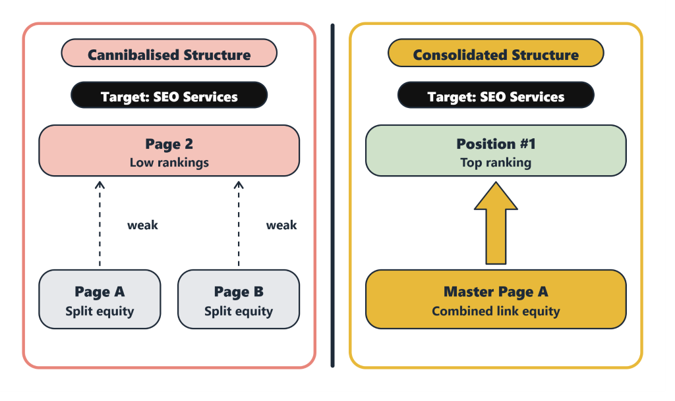
What it looks like in practice:
- The wrong page ranks: Someone searching for SEO services, for example, lands on your SEO content writing page. That ruins the user experience and tends to raise the bounce rate on that page.
- URLs flip-flop: Different pages take turns ranking for the same keyword from week to week.
- Rankings stall: Neither page can break into the top results, even though the topic is a priority for you.
- Signals get split: Backlinks, internal links and clicks are spread across pages instead of strengthening one.
A common misconception is that more pages targeting a keyword means more chances to rank. But it doesn’t work that way. You want the right page to rank for the right query, not your domain to show up with whichever page happens to win.
Is Keyword Cannibalisation Always a Problem?
No, keyword cannibalisation isn’t always a problem, and this is worth understanding before you start deleting pages.
Google’s John Mueller has said that multiple pages ranking for the same query isn’t a problem in itself. Search Console only shows a page for a query when it was actually shown, so it reflects what Google chose to serve. Google also commonly shows up to two results from one domain on a results page, so seeing two of your URLs there isn’t unusual.
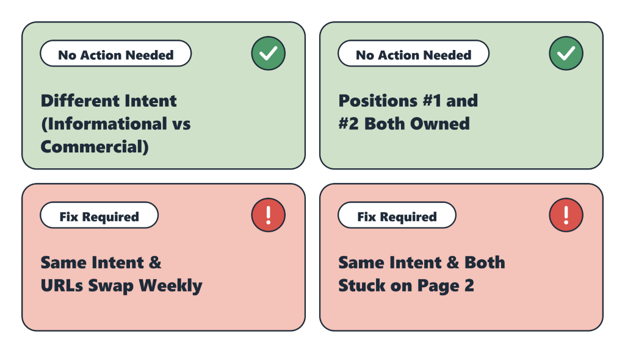
The test that matters is search intent and performance. Two pages can share a keyword without competing, as long as they answer different needs. A “what is SEO” guide and an “SEO services” page might both mention “SEO”, but they serve a different searcher.
| Situation | Real problem? |
| Two pages with different intents both appear for a keyword | Not always |
| Your two pages hold the top two spots for a query, consistently over time | Usually no. You are taking up more of the results |
| Two pages with the same intent keep swapping positions | Yes |
| Two pages with the same intent both sit on the 2nd page | Yes |
| The wrong page (informational) ranks for a commercial query | Yes |
Where Does Keyword Cannibalisation Happen?
There are two main places where keyword cannibalisation happens.
- At the metadata level: Two or more pages have titles, H1s or meta descriptions aimed at the same keyword. This is the easiest kind to fix, because you can usually just rewrite the tags.
- At the content level: This is the harder one. It happens when two or more pages cover the same topic in similar depth, with similar answers. This is trickier because you have to find all the competing pages, and the fix may involve merging them.
It tends to show up as one of two patterns: two pages competing for the same keywords at the same time, or two pages flip-flopping, taking turns at the top for the same keyword.
Common causes:
- A service page and a location page targeting the same keyword
- An old blog post and a newer one on the same topic
- WordPress category and tag archive pages targeting the same phrase as a blog post or a service page
- Product or category pages with overlapping descriptions
- Landing pages built for campaigns and never retired
How to Find Keyword Cannibalisation: A Step-by-Step Audit
Step 1: Build a keyword-to-URL map
Create a spreadsheet listing your important URLs and the primary keyword each one is meant to rank for. Duplicate entries in the keyword column are your first suspects. This is also the file you will use later to prevent the problem.
Step 2: Check Google Search Console (free)
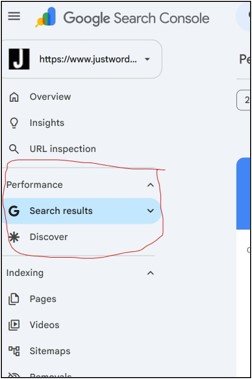
- Open Search Console and go to Performance → Search results.
- Click + Add filter → Query.
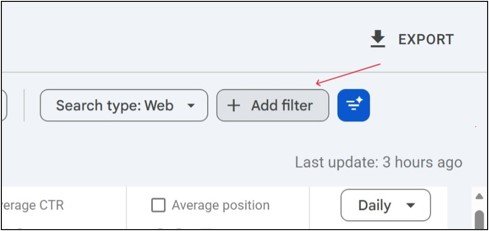
- Choose Exact query for your target keyword or Queries containing to include variations. Enter the keyword and apply the filter.
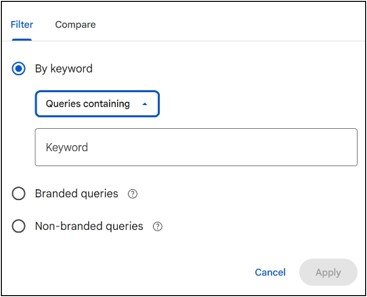
- Switch to the Pages tab. If two or more of your URLs show up for that query, note each one’s clicks, impressions and average position.
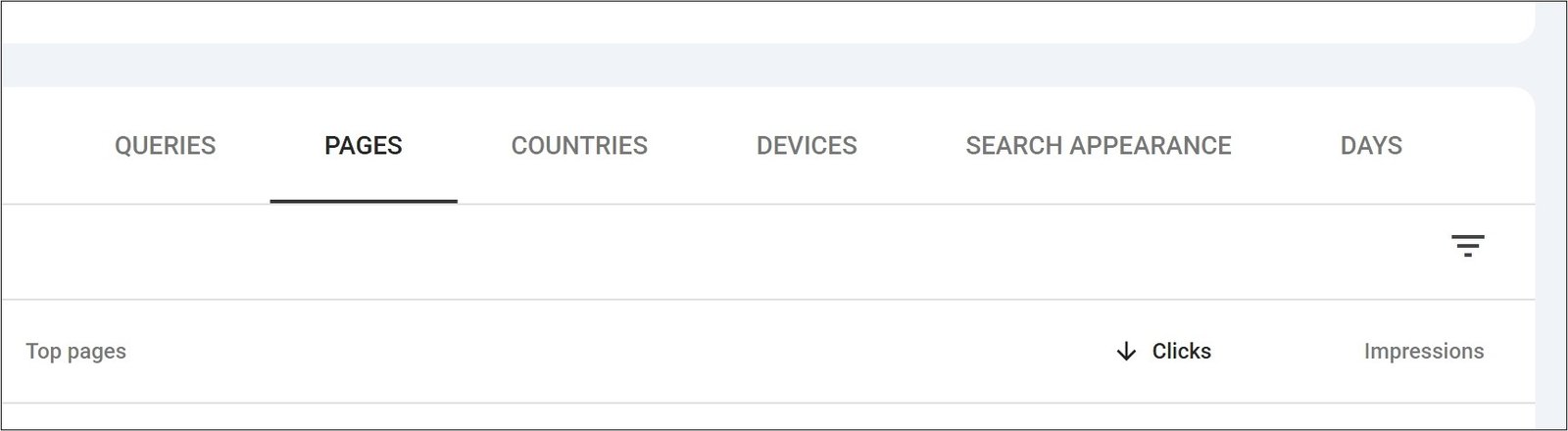
- Change the date range and compare. If impressions move back and forth between URLs over time, then Google is swapping between them.
Search Console reports averages, so apply filters such as country and device before drawing conclusions.
Step 3: Use a keyword cannibalisation detection tool
| Tool | What it does | Cost |
| Google Search Console | Shows which of your URLs appear for a query | Free |
| Semrush Position Tracking | Has a Cannibalisation report with a keyword view and a page view, and shows ranking history. Start with the keyword view. Availability depends on your plan. | Paid |
| Ahrefs | In Site Explorer, open the Organic keywords report and switch on “Multiple URLs only” to see keywords where several of your pages rank. | Paid |
| Screaming Frog | Its SEO Spider crawls your site and flags duplicate or near-duplicate titles, H1s and meta descriptions. | Free up to 500 URLs, then paid |
| Yoast SEO / Rank Math | Warn you when you reuse a focus keyword on another page. Useful as a prevention check. | Free versions available |
| site: search operator | Type site:yourdomain.com “keyword” in Google to see which pages Google considers relevant. | Free |
The site: search operator is a rough check, not a complete list. So treat it as a starting point.
Step 4: Confirm it’s real
An overlap doesn’t need action every time. For each suspect keyword, ask three questions:
- Do both pages satisfy the same search intent? Open the live results and see what Google is rewarding.
- Are the URLs swapping, or are both stuck low?
- Is the wrong page ranking?
If the answer to the first is yes and to either of the others is yes, you have a cannibalisation problem worth fixing.
This happened with Asian Footwears, where an indexed staging website created duplicate-content and cannibalisation issues. Justwords addressed the underlying technical problems by restricting crawling of the staging environment, restructuring URLs and implementing canonicalisation, alongside other technical and content SEO improvements. Across the broader SEO engagement, organic clicks grew by 67% and impressions by 109% between December 2024 and December 2025.
How to Fix Keyword Cannibalisation: 5 Ways
First, choose your primary page for each keyword. Look at which page has the best intent match, the most backlinks, the most traffic and the best conversions. That page wins, and the fixes below are about helping it.
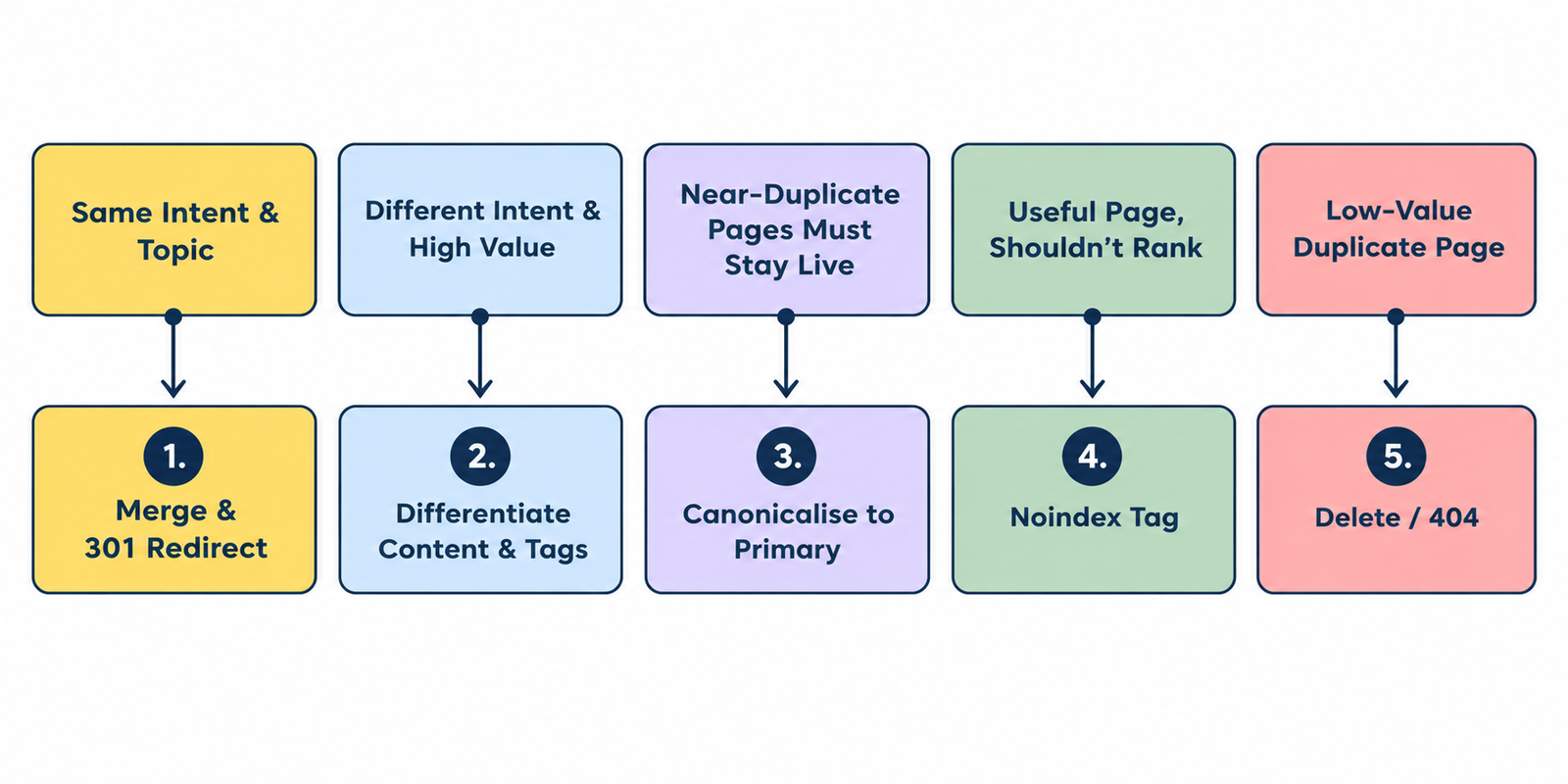
1. Merge and 301 redirect
This works best when two pages cover the same topic and offer similar information. Combine the best content from both into one stronger page, then 301 redirect the other URL to it. The redirect passes most of the old page’s link value to the new one, and all your internal and external links end up pointing at one URL. Update internal links so that they point straight to the surviving page.
2. Differentiate (re-optimise one page)
Use this when both pages are valuable and serve different needs, as in the SEO services and SEO services in Delhi example. Rewrite the weaker page’s title, H1 and body copy to target a distinct keyword and intent. Then adjust internal links and anchor text so each page is clearly linked for its own topic. Avoid using nofollow on internal links to steer rankings. It’s not a reliable fix and wastes link value.
3. Canonicalise
If you need similar pages to stay live, such as product variations or filtered versions, add a canonical tag on the secondary pages pointing to the primary one. This tells Google which version to index and rank. Remember that a canonical is a hint and not an instruction. So, it works best on near-identical content.
4. Noindex
Use noindex for pages that are useful to visitors but don’t need to rank, such as thin tag archives, internal search results or utility pages. Make sure the page isn’t also blocked in robots.txt, because Google can’t see a noindex tag on a page it isn’t allowed to crawl.
5. Delete
If a page has little value and is stealing traffic from a better one, remove it. First check whether it has backlinks or traffic. If it does, 301 redirect it to the closest relevant page. If there’s no relevant page to send it to, let it return a 404 (page not found) or 410 (permanently removed).
Which fix should you use?
| Situation | Best fix |
| Two pages, same topic, same intent | Merge and 301 redirect |
| Both pages valuable, different intent | Differentiate |
| Similar pages that must stay live | Canonical |
| Useful for users, shouldn’t rank | Noindex |
| Low-value page with no purpose | Delete (with a 301 if it has links) |
After any fix, realign your internal links. Link to the primary page from related pages using the keyword as anchor text, and remove or change links that point to the secondary page with the same anchor. Then request indexing in Search Console and monitor rankings for the next few weeks.
Also Read: A Complete Checklist for On Page SEO
How to Fix Keyword Cannibalisation in WordPress
WordPress sites run into cannibalisation often, because blog posts, pages, categories and tags can all target similar phrases. Here’s a practical order of work to fix them.
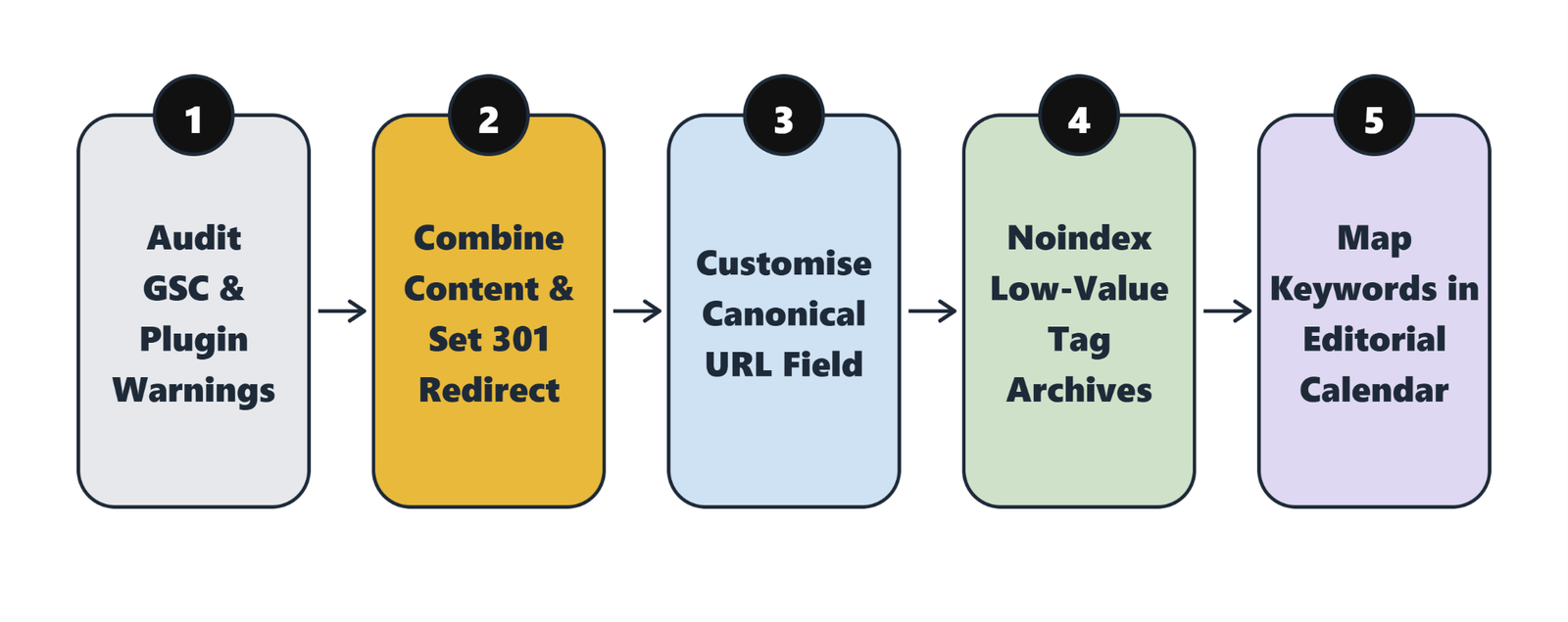
- Spot it: Use Search Console as described above. In the editor, Yoast SEO’s “Previously used keyphrase” and Rank Math’s “Focus Keyword Uniqueness” both warn you when a focus keyword has already been used on another post, so check those warnings across your content.
- Merge and redirect: After combining two posts, set up a 301 redirect using your SEO plugin’s redirect feature (Rank Math includes Redirections, and Yoast Premium has a redirect manager) or a dedicated redirect plugin. Update internal links to the new URL.
- Set canonicals where needed: WordPress adds a self-referencing canonical tag by default. For near-duplicate pages, override it in your SEO plugin. In Rank Math, for example, it’s under the Advanced tab of the post editor, in the Canonical URL field.
- Noindex low-value archives: If your tag, author or date archives target the same phrases as your blog posts and don’t add value, set them to noindex in your SEO plugin’s search appearance settings. Keep your main category pages indexable and make each one distinct.
- Differentiate location and service pages: If you have many city or service pages built from one template, give each its own content, such as local details, examples and FAQs, so they don’t read as copies.
- Prevent repeats: Add a keyword map to your editorial calendar and check it before every new post.
Take a backup before merging or deleting content, and test your redirects after publishing them.
How to Avoid Keyword Cannibalisation in Future
Prolonged cannibalisation is frustrating. So it’s better to stop it from starting. Before you publish a new page or blog post:
- Search first. Google site:yourdomain.com “target keyword” and check your keyword-to-URL map.
- If a page already targets that keyword and intent, update and improve it instead of writing a new one.
- Give each URL one primary keyword and one intent. Related long-tail terms are fine, but the main target should be unique.
- Plan in clusters. Build one main page per topic, with supporting pages that answer different questions and link back to it.
- Audit regularly. Re-run your Search Console check every quarter, and after major content pushes.
A clear one-page-per-topic structure also likely makes it easier for AI search tools to identify which page to cite, though that’s a reasonable expectation rather than something measured.
What You Gain From Fixing Keyword Cannibalisation
- A stronger primary page that ranks higher for its keyword.
- The right page showing up for the right query.
- Backlinks and internal links concentrated on one URL.
- Better click-through rates and conversions, because visitors land where they expect.
- A cleaner, easier-to-manage site.
Remember, results vary by site and depend on how quickly Google recrawls your changes.
Conclusion
Keyword cannibalisation sounds heavy, but dealing with it systematically makes your site easier for both search engines and visitors to understand. Not every overlap needs fixing, so focus on cases where pages share an intent and hold each other back. Pick a primary page, choose the right fix, tidy your internal links and keep a keyword map so it doesn’t come back.
If you want an expert to audit your website for cannibalisation, talk to our team or explore our SEO services.
FAQs
1. What is keyword cannibalisation in SEO?
It’s when two or more pages on the same site target the same keyword and search intent, so they compete with each other in the results. It can split clicks, links and rankings between pages and lead to the wrong page ranking.
2. Does keyword cannibalisation cause a Google penalty?
No. It’s not a penalty. It’s a missed opportunity, because your pages may rank lower or swap places instead of one strong page ranking well.
3. How do I find keyword cannibalisation?
In Google Search Console, filter Performance by a query and open the Pages tab to see which of your URLs appear. Tools like Semrush, Ahrefs and Screaming Frog can find overlaps across your whole site.
4. What’s the best way to fix keyword cannibalisation?
It depends on the situation. Merge and 301 redirect if pages have the same intent. Differentiate if both are valuable. Use canonical tags for near-duplicates, noindex for pages that shouldn’t rank, and delete low-value pages.
5. How do I fix keyword cannibalisation in WordPress?
Find the competing pages, merge them and set a 301 redirect with your SEO plugin, set canonicals where needed, noindex low-value archives, and use focus keyword warnings in Yoast or Rank Math to avoid repeats.
6. How long does it take to see results after fixing cannibalisation?
There’s no fixed timeline. Google needs to recrawl and reprocess the pages, so improvements typically show up over a few weeks to a couple of months. Track the primary page in Search Console.
7. Is it bad if two of my pages rank for the same keyword?
Not necessarily. If they serve different intents, or if they hold the top two positions, it can be fine. It’s a problem when they share an intent and hold each other back.