On-page SEO is the practice of optimising everything on a page that you control, including its content, HTML tags, headings, links, images and page experience, so that search engines and AI tools can understand it and searchers find it useful.
As long as there are search engines like Google, businesses will want to rank higher and grow their traffic. Through all the twists and turns in SEO, on-page SEO has been the constant. But it hasn’t stood still. Placing a keyword in the right spots is no longer enough. Google now rewards pages that match search intent, show real expertise, load well and are structured so that AI tools can pull clear answers from them.
This on-page SEO checklist covers 25 points in the order you should work through them, whether you are publishing a new page or running an on-page SEO audit on an old one.
Key Takeaways
- On-page SEO means optimising everything on the page that you control, including content, HTML tags, headings, links, images and page experience.
- Start with search intent and content quality. Tags and technical fixes come after that.
- Meta descriptions don’t affect rankings, but they affect clicks. Google also rewrites titles and descriptions often.
- Some old advice has expired. INP replaced FID in 2024, and FAQ rich results stopped appearing in Google Search in May 2026.
What Are the Main On-Page SEO Factors?
On-page SEO is separate from off-page SEO (backlinks and brand mentions) and technical SEO (site-wide crawling and infrastructure). The on-page SEO factors fall into five groups:
| Group | What it covers | Why it matters |
| 1. Content and search intent | Relevance, depth, expertise, keywords | Largest influence on whether you rank at all |
| 2. HTML elements | Title tag, meta description, URL, headings, images, schema | Helps search engines understand the page and earns clicks |
| 3. Links | Internal and external links | Gives context, crawl paths and credibility |
| 4. Page experience and technical | Speed, mobile, HTTPS, indexability | Stops problems from holding good content back |
| 5. AI search readiness | Answer structure | Makes content easy to extract and cite in AI answers |
As a rule of thumb, groups 1 and 2 are where most pages gain or lose the most. Treat group 4 as hygiene.
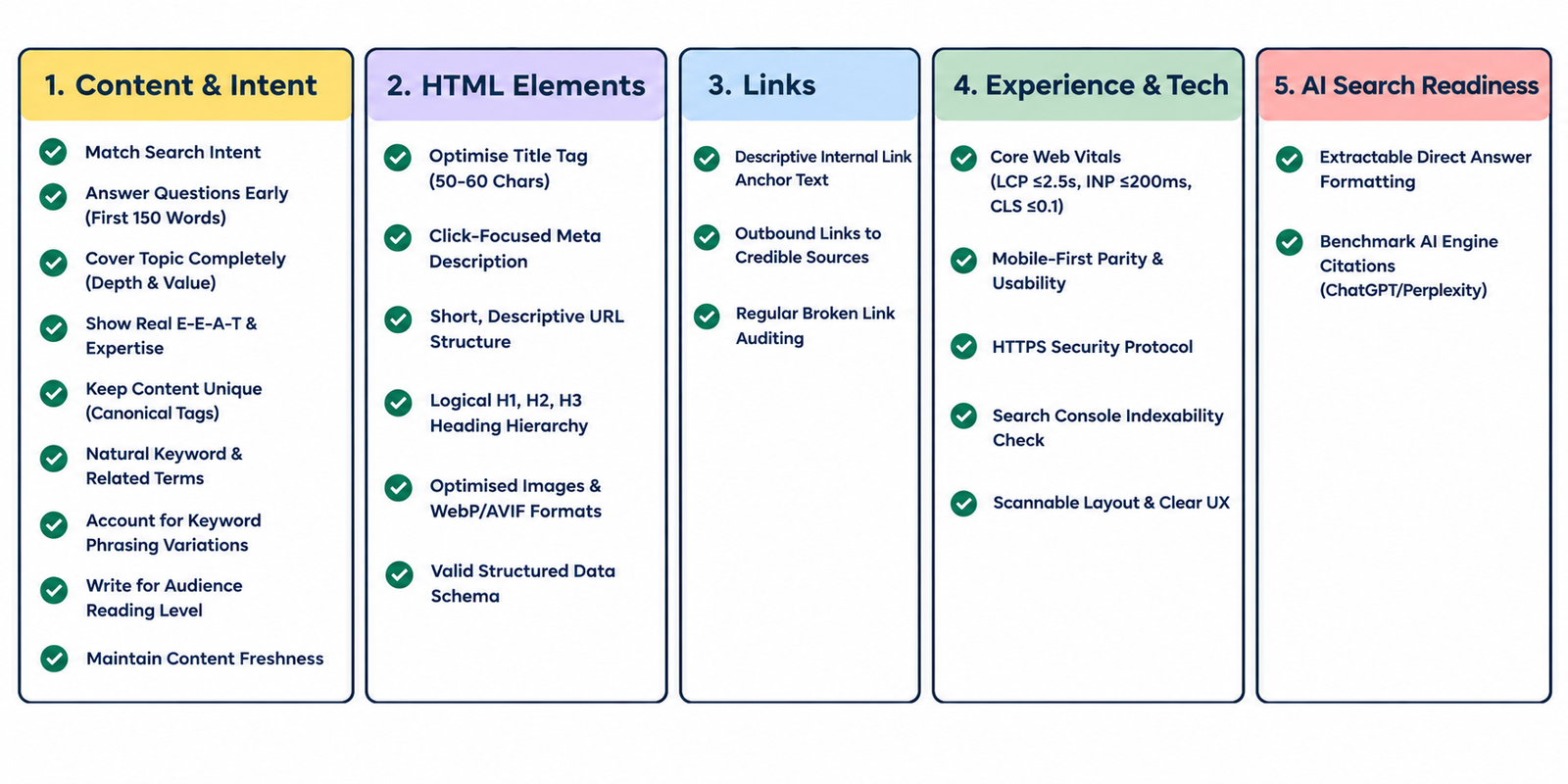
Group 1: Content and Search Intent
- Match search intent: Search your target keyword and study the top results. Are they guides, lists, product pages or comparisons? If your page is a different type from what Google is already rewarding, it will struggle however well it’s optimised.
- Answer the main question early: Put a clear answer or summary in the first 100–150 words and use your primary keyword naturally there. The opening of a page carries weight with Google, with readers, and with AI tools looking for something to quote. For example, our website migration SEO checklist uses the term “website migration” right at the start.
- Cover the topic completely: Longer pages often rank well because they cover more ground, but length by itself isn’t a ranking factor. Answer the questions a searcher would ask next, and add something competitors don’t have (e.g., original data, a real example, a template or a tool).
- Show real experience and expertise: Add a named author with a short bio, first-hand examples, screenshots or data and sources for your claims. This is what Google calls E-E-A-T (experience, expertise, authoritativeness, trust).
- Keep content unique: Don’t reuse the same copy across blogs, category pages, products or other websites. Google usually doesn’t penalise duplicates, but it will pick one version to rank, and you can’t be sure it’s the one you want. Use canonical tags where duplicates are unavoidable.
- Use your keyword naturally, with synonyms and related terms: Repeating one keyword unnaturally doesn’t help and makes the page hard to read. Use the primary keyword a few times where it fits, and add synonyms and related terms. For “local SEO”, that could be local search, local SEO tools, local SEO for small businesses, vernacular SEO or local SEO WordPress plugins. You can also use LSI keywords. But what matters more is covering the related terms a knowledgeable writer would naturally use. Google’s People Also Ask, related searches, Semrush and Ahrefs will show you what those are.
- Account for keyword variations: People search for the same thing in different ways. If four people look for a salon in Noida, they might type:
- Hair salon in Noida
- Noida hair salon
- Best hair salon in Noida
- Hair salon near me
Google understands that these overlap, so don’t force one exact order everywhere. Use the most common phrasing in your title and H1, and let the variations appear naturally in subheadings and body copy.
- Write at your audience’s reading level: Plain, simple language works for most websites. But it depends on the niche. Scientific research readers expect more depth than shoppers browsing home decor. Short paragraphs and clear sentences help everyone.
- Keep it fresh: Google often shows when a page was last updated, and readers prefer recent information. Update stats, tools and screenshots regularly, and change the visible date only when you have made real updates.
Group 2: HTML Elements
- Optimise your meta title: Your title tag is one of the strongest on-page signals and the first thing searchers see. For good SEO title tag optimisation:
- Put the primary keyword near the start where it reads naturally.
- Keep it to roughly 50–60 characters. Remember, Google truncates by pixel width.
- Make it unique for every page and an honest match for the content.
- Avoid stuffing and generic labels.
| Weak | Better |
| Blog | Company Name | On-Page SEO Checklist (2026): 25-Point Optimisation List |
| SEO checklist, on-page SEO, SEO tips, SEO guide | How to Run an On-Page SEO Audit in 30 Minutes |
Google sometimes rewrites titles, especially when they are stuffed, generic or too long. A clear, accurate title reduces the chance.
- Write a meta description that earns the click: Meta descriptions are not a ranking factor, so don’t expect keywords here to lift your position. They still matter because a good one can earn more clicks. Ahrefs’ study of 20,000 keywords found Google rewrote meta descriptions about 63% of the time. Write an honest summary in about 150–160 characters, include the primary keyword and give the reader a reason to click.
- Use a short, descriptive URL: Include the target keyword, use lowercase letters and hyphens, and cut filler words. If your topic is “Complete List of Best Free SEO Tools for Your Website” and the keyword is “SEO tools”, then a slug like “/seo-tools/” works better than “/complete-list-of-best-free-seo-tools-for-your-website/”. Short URLs show only a slight link to rankings, but they are clearer, easier to share and easier to remember. Never change a live URL without a 301 redirect.
- Structure your headings properly: Use one H1 for the page title, with the primary keyword in it. Use H2s and H3s to build a logical hierarchy, and include the keyword or its variations in some of them where it’s natural. Phrasing H2s as the questions people ask also helps with AI Overviews answers.
- Optimise images: Write descriptive alt text. It helps visually impaired readers and image search first, and it helps crawlers too. Include your keyword only where it truly describes the image. Also:
- Use descriptive file names
- Compress images and use modern formats like WebP or AVIF
- Set width and height so the layout doesn’t jump while loading
- Lazy-load images below the fold, but not your main above-the-fold image
- Add schema that matches the page: Use Article or BlogPosting, Organization, BreadcrumbList and Person (for the author) schemas on content pages, and Product, Review or Event schemas where relevant. Markup must reflect what’s visible on the page. Be aware of two changes: HowTo rich results were removed by Google in 2023, and FAQ rich results stopped appearing in Google Search by May 2026. That means you don’t need to add them to your pages expecting a rich result. But you also don’t need to rush to remove existing FAQ markup either.
Group 3: Links
- Add internal links with descriptive anchor text: Link from the new page to relevant existing pages, and from older pages to the new one. Use anchor text that tells the reader what they will find, instead of just writing “click here”. Internal links help crawlers reach pages through different paths and pass context between them. Make sure no important page is an orphan.
- Link out to credible sources: Linking to reputable sources adds value for readers and makes your claims easier to verify. Use proper anchor text. And add attributes like rel=“sponsored” to paid links, rel=“ugc” to user-generated links, and rel=“nofollow” to links you don’t want to vouch for. Also, remember links are followed by default, so there’s no “dofollow” attribute to add.
- Fix broken links: Check for dead internal and external links regularly with Search Console, Screaming Frog or a site audit tool. Replace or remove them.
Group 4: Page Experience and Technical
- Pass Core Web Vitals: These are Google’s real-user speed and experience metrics. The good targets are:
| Metric | Measures | Good |
| LCP (Largest Contentful Paint) | Loading speed of the main content | 2.5 seconds or less |
| INP (Interaction to Next Paint) | Responsiveness to clicks and taps | 200 milliseconds or less |
| CLS (Cumulative Layout Shift) | Visual stability | 0.1 or less |
Google measures these at the 75th percentile of real visits. Check the Core Web Vitals report in Search Console and test pages in PageSpeed Insights. Typical fixes are compressing images, removing unused scripts, limiting third-party scripts and reserving space for images and ads. Speed won’t rescue irrelevant content, but a slow page loses visitors before they read a word.
- Make sure the page works on mobile: Google indexes the mobile version of your page first. Check that the mobile version has the same content, headings, structured data and links as the desktop one, with readable text and tappable buttons. Test with PageSpeed Insights and the device mode in Chrome DevTools.
- Use HTTPS: It’s a light ranking signal, but browsers warn visitors about insecure pages, which damages trust and conversions. If you aren’t on HTTPS yet, it’s time to switch.
- Check indexability: Make sure the page isn’t blocked by robots.txt or a noindex tag, has a self-referencing canonical tag and is in your XML sitemap. The URL Inspection tool in Search Console shows how Google sees it.
- Make the page easy to scan and use: Use clear headings, short paragraphs, bullets, tables, visuals and a table of contents for long pages. Avoid pop-ups that cover content. Treat dwell time and bounce rate as diagnostics, not ranking levers. Google hasn’t confirmed them as direct signals. But if visitors leave straight away, the page probably isn’t meeting their intent, and that’s worth fixing. In GA4, look at engagement rate.
Group 5: AI Search Readiness
- Structure answers so they can be lifted: Put a direct answer under each question-style heading, then add detail. Use lists and tables for steps and comparisons, define key terms in one clear sentence, and end with an FAQ section. Google’s own guidance for AI features in Search is that standard SEO fundamentals still apply, with no special markup required. The same habits that help readers help AI tools too.
- Check how AI tools answer your target question: Ask ChatGPT, Claude and Google AI Mode the question your page targets. Note who gets cited and what format their content uses, then check whether your page gives a clearer, more complete answer. Gaps you find here are your next edits.
Read more: Advanced SEO Techniques to Improve Google Rankings
How to Run an On-Page SEO Audit (About 30 Minutes per Page)
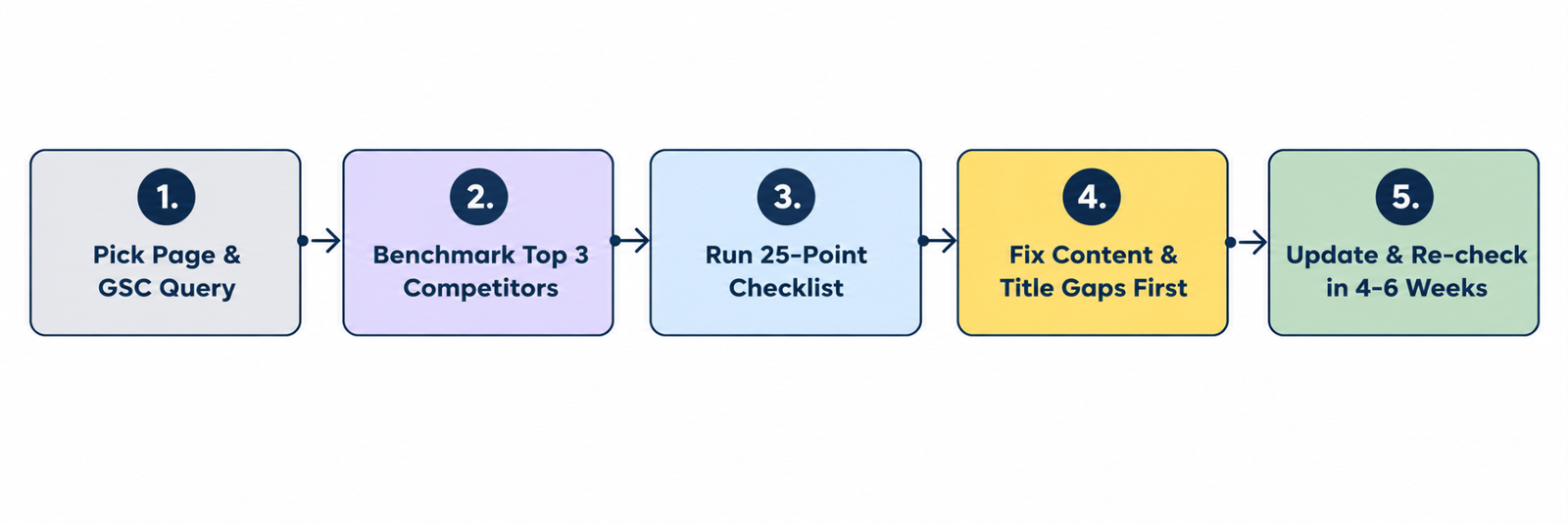
Use this process to SEO audit pages you have already published.
- Pick a page and its target keyword: In Search Console, check the queries it ranks for, impressions, click-through rate and average position.
- Compare it to the top 3-5 results: Look at intent, depth and formats. What do they cover that you don’t?
- Walk through the 25 points: Mark each one as pass or fix.
- Prioritise: Fix intent and content gaps first. Then fix titles and descriptions on pages with high impressions but low click-through rates. Technical fixes come last unless something is broken.
- Update and re-check: Note the date of the changes and review results after 4 to 6 weeks.
Outdated On-Page SEO Advice to Drop
| Old advice | What’s true in 2026 |
| The meta description is a huge ranking factor | It isn’t. It influences clicks, not rankings. |
| Use LSI keywords | Google has said there’s no such thing. Cover related terms naturally. |
| Add structured data inside your meta description | Schema is separate markup on the page, and not part of the meta description. |
| Optimise for First Input Delay | INP (Interaction to Next Paint) replaced FID in March 2024 |
| Add FAQ and HowTo schema for rich results | HowTo rich results ended in 2023 and FAQ rich results in May 2026 |
| Dwell time and bounce rate are ranking factors | Not confirmed as direct signals. Use them as diagnostics. |
| Longer content always ranks better | Depth and completeness matter. But length alone doesn’t. |
| Aim for a specific “reading level” | Write at the level your audience reads. There’s no fixed target to hit that applies to everyone. |
Conclusion
Ticking every box on this on-page SEO checklist will put your pages in a strong position. Start with intent and content quality, make sure your titles, links and structure are clean, and treat speed and mobile as the baseline. Then make your answers easy for AI tools to find and quote.
Free SEO tools can automate many of these tedious checks. But optimisation only works when you have a clear idea of who you are optimising for and why. So get your strategy straight, work through the checklist and re-audit your key pages every few months.
If you want an expert to run this SEO audit on your site, talk to our team or explore our SEO services.
FAQs
1. What is an on-page SEO checklist?
It’s a list of the optimisations to make on a web page so that it can rank and attract clicks. It covers content, title tags, meta descriptions, URLs, headings, images, links, page speed, mobile usability and structured data.
2. What are the most important on-page SEO factors?
For on-page SEO, content that matches search intent comes first, followed by a clear title tag, a logical heading structure, good internal links and a fast, mobile-friendly page. Other factors matter less on their own.
3. Is the meta description a ranking factor?
No. Google doesn’t use the meta description for ranking, but a well-written one can raise click-through rate. Google often rewrites it to suit the search query.
4. How long should a title tag be?
Aim for roughly 50–60 characters so it isn’t cut off in results. Google truncates by pixel width, so wide letters can run out of space sooner.
5. What’s the difference between on-page, off-page and technical SEO?
On-page SEO covers what’s on the page itself, like content and HTML tags. Off-page SEO covers signals from other sites, like backlinks. Technical SEO covers site-wide setup, like crawling, indexing and site architecture.
6. How often should I run an on-page SEO audit?
Review your most important pages every 3 to 6 months and any page whose rankings or click-through rate has dropped. Re-audit after major Google updates or site changes.
7. Does on-page SEO still matter with AI search?
Yes. AI search tools draw on well-structured, authoritative, clearly written pages, which means the same fundamentals apply. Direct answers, clear headings and first-hand expertise help in both.