A website loses organic traffic for one of these reasons: technical errors that block crawling or indexing, a Google algorithm update, a redesign or migration that broke URLs, outdated or weak content, lost backlinks and stronger competitors, AI answers absorbing clicks, or seasonal shifts in demand. The fix depends entirely on which one you have, so diagnosis comes first. Compare periods in Google Search Console, then check whether the drop was sudden or gradual, sitewide or limited to certain pages, and whether it hit clicks, impressions or rankings.
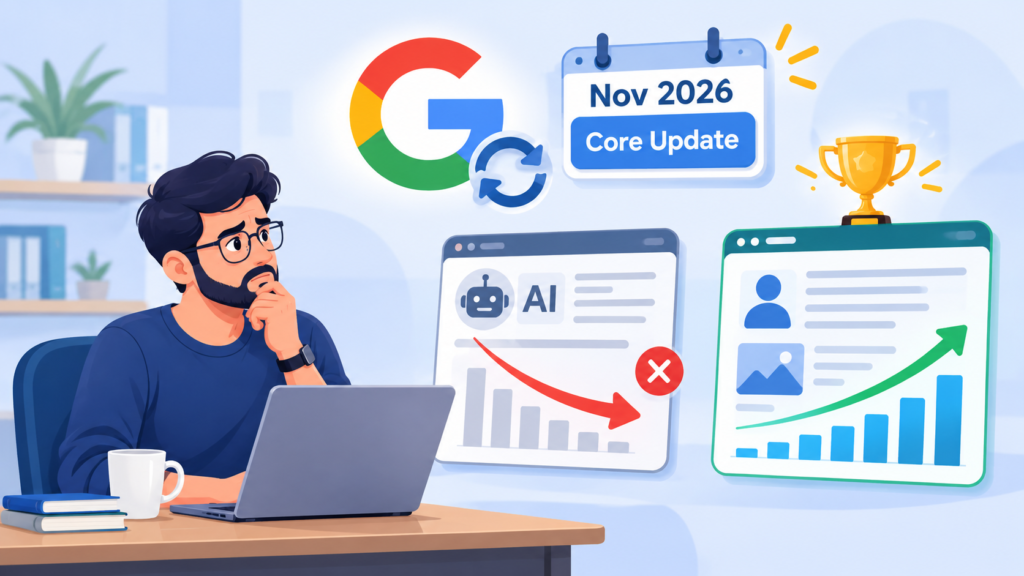
The costly mistake is acting before you know the cause. Teams rewrite pages, disavow links or switch agencies in a panic, and the real problem stays untouched. Timing matters too. Google began its November 2026 core update on 10 November, and the rollouts can take up to two weeks. Changes you make mid-rollout blur the evidence you need to read the result.
In this article, we will give you a diagnostic process and the 7 causes, with the signs, the checks and the fixes for each. We also provide a recovery plan you can start this week.
Key Takeaways
- Confirm the drop is real first. Compare Search Console with GA4, and compare against the same period last year.
- Match the pattern to the cause: a sudden sitewide drop points to technical issues, a manual action or an update, and a slow slide points to content decay, competitors or lost links.
- If impressions and rankings hold while clicks fall, AI answers and search features are the likelier cause, and the fix is different.
- Wait for a confirmed core update to finish before judging it, and fix technical blockers immediately.
- Measure recovery in leads and revenue, since sessions alone can mislead.
Step Zero: Confirm the Traffic Drop Is Real
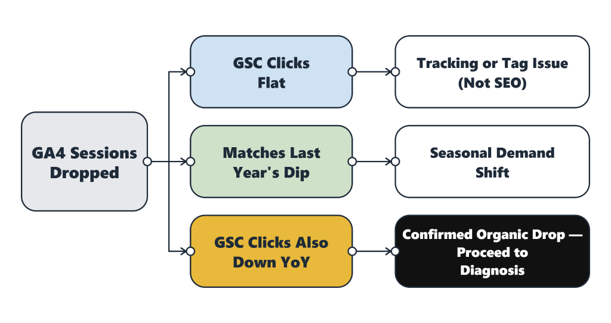
Open Search Console and GA4 side by side for the same dates. If Search Console clicks are flat and GA4 organic sessions fell, then the usual suspect is tracking. A removed tag, a consent banner change or a broken template after a redesign can make traffic vanish from reports without any change in Google.
After doing this, compare the numbers against the same dates last year. A fall that repeats every year is seasonality and needs a different response from a genuine loss.
How to Diagnose an Organic Traffic Drop in Google Search Console
In the Performance report, set a date range before the drop and one after, and compare these four numbers: clicks, impressions, average position and click-through rate. Then segment by page, query, device, country and search appearance. The pattern points to the cause.
| What you see | What it usually points to |
| Sudden, sitewide drop starting on one date | Technical issue, manual action, algorithm update or migration |
| Gradual decline over several months | Content decay, competitors, lost links or AI answers |
| Drop concentrated in one section or page type | Template or technical change, keyword cannibalisation or an intent shift |
| Impressions and position steady, clicks and click-through rate down | AI Overviews and other search features absorbing clicks |
| Impressions and position both down | Genuine ranking loss |
| Drop in one country or device only | Local update, mobile problem or regional demand change |
Cause 1: Technical SEO Problems
Signs: A sudden drop, pages missing from the index, or a spike in errors in the Pages report. Common culprits include a noindex tag or robots.txt block pushed live from a staging site, server errors, broken canonical tags and redirect chains.
How to confirm: Check the Pages report in Search Console for pages “excluded by noindex” or “blocked by robots.txt”, use the URL Inspection tool on key pages and review Crawl Stats for server errors. Also check your Core Web Vitals report, since slow or unstable pages weaken the experience.
Fix: Remove accidental blocks, resolve server errors, correct canonicals and resubmit your sitemap. A full SEO audit finds issues that spot checks miss.
Cause 2: A Google Algorithm Update
Signs: The drop starts inside a confirmed rollout window and spreads across many pages and topics. Google’s Search Status Dashboard lists the 2026 ranking updates: the March core update (27 March to 8 April), the May core update (21 May to 2 June), spam updates in March, June, August and September, and the November core update, which began on 10 November.
How to confirm: Match your drop date to the dashboard. Spam updates target policy violations, so also check Security and Manual Actions in Search Console.
Fix: Core updates are not penalties, and no single change reverses them. Wait until the rollout completes and allow some time afterwards, as Google advises, and then compare the weeks before and after. After that, improve the pages that lost ground on helpfulness, depth, original evidence and clear authorship.
Cause 3: A Website Redesign or Migration
Signs: The drop begins within days of a redesign, a CMS change, a domain move or a URL restructure. Rankings fall on pages whose addresses, titles, headings or internal links changed.
How to confirm: Compare old and new URLs, check whether 301 redirects exist for every changed address, and look for lost metadata, removed content, missing structured data or pages blocked on the new site.
Fix: Map every old URL to its closest new equivalent with a 301 redirect, restore titles, headings and internal links, remove any staging noindex tags and resubmit the sitemap. Use our website migration SEO checklist before the next launch, and keep SEO-friendly URL structures in mind during any restructure.
Cause 4: Content Quality Problems and Decay
Signs: A gradual slide, with pages dropping from position 3 to position 8 over months. Outdated statistics, thin pages, generic AI-rewritten articles and two pages that compete for the same query all cause it.
How to confirm: Sort lost clicks by page in Search Console. Look for pages whose rankings dropped, check their publish dates and see whether another page of yours now ranks for the same query.
Fix: Run a content audit and decide for each page whether to keep, update, consolidate or retire it. Merge pages that suffer from keyword cannibalisation, refresh facts and examples, and add original evidence. Match each page to the search intent behind its query. Generic rewrites rarely help.
Cause 5: Lost Backlinks and Stronger Competitors
Signs: Rankings slip on competitive terms, and competitor pages now sit above yours. A backlink tool shows falling referring domains, or rivals gaining links faster than you.
How to confirm: Compare your referring domains over the last 6-12 months, look for lost links from high-authority sites and review who now ranks above you and why.
Fix: Reclaim lost links where the page moved or was removed, and replace them by earning new ones through original research, expert commentary and digital PR. And you can find competitors’ keywords to see where they have pulled ahead. Our guide to high-quality backlink strategies lists tactics that hold up.
Cause 6: AI Overviews and Zero-Click Searches
Signs: Impressions hold, average position holds, yet clicks and click-through rate fall, mostly on informational queries. Your page still ranks, and fewer people reach it. Zero-click searches are continuing to rise. SparkToro and Similarweb found that 68.01% of US Google searches ended without a click in early 2026, up from 60.45% in 2024.
How to confirm: In Search Console, filter to informational queries and compare click-through rate before and after. Then search those queries yourself and look for AI Overviews or other search features above your result.
Fix: You cannot reverse this, so adapt to it. Put direct answers at the top of key pages to earn citations, strengthen commercial and local pages that suffer less from AI answers, and judge success on leads and revenue. Our guide to AI Overviews and SEO explains what is changing.
Cause 7: Seasonality and Shifting Search Demand
Signs: The same dip appears every year, or interest in your topic has fallen. In India, patterns tied to festive seasons, the financial year-end and admission cycles are common.
How to confirm: Compare year-over-year in Search Console and check Google Trends for your core topics.
Fix: Plan content ahead of seasonal peaks, refresh seasonal pages early and add content for adjacent topics where demand is growing. If demand for your core topic has fallen, diversify into the questions buyers now ask.
A 30-Day Traffic Recovery Plan
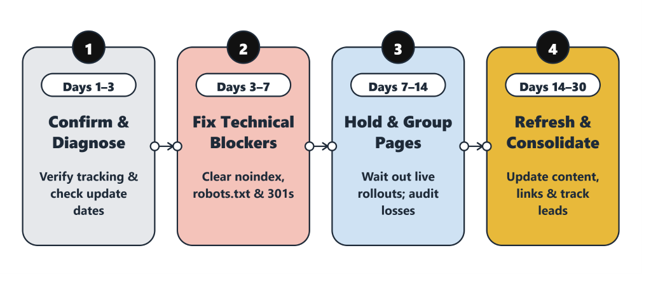
- Days 1 to 3: Confirm the drop, match it to a pattern and check the Search Status Dashboard for updates.
- Days 3 to 7: Fix technical blockers at once – accidental noindex tags, robots.txt blocks, server errors and broken redirects.
- Days 7 to 14: If an update is still rolling out, hold content changes until it finishes. Meanwhile, list the pages that lost the most clicks and group them by cause.
- Days 14 to 30: Refresh and consolidate priority pages, reclaim lost links and add answer-first sections with original evidence.
- Ongoing: Track leads and revenue alongside clicks. Our guide to SEO ROI measurement shows how to connect organic traffic to business results.
When a Traffic Drop Hides Progress
A fall in clicks does not always mean a loss in rankings. Coloplast Store India, an online store for ostomy care products, reached about 16K organic visits a month in December 2025, with 70 keywords in the top three positions and 13 appearing in AI Overviews. By November 2026, Justwords’ work with the brand had lifted top-three keywords to 93 and AI Overview appearances to 73, even though traffic settled at about 10K. A report that tracked only sessions would have called that a decline. A report that tracked rankings, visibility and conversions showed a stronger position.
The lesson applies to your own diagnosis. Check impressions, rankings and conversions before you decide the site is failing.
What Next: Diagnose Before You Fix Anything
Spend one hour this week on the diagnosis table above. Match your drop to a pattern, check the update dates and test whether tracking is intact. Each cause has a different fix, and treating the wrong one wastes weeks of effort while traffic keeps falling. Every month a real problem goes unfixed, competitors take the clicks you lost.
If you want a clear answer on what is causing your drop, our team can run a full diagnosis through our SEO services, covering technical health, content and links.
FAQs
1. Why did my website traffic drop suddenly?
Sudden drops usually come from technical errors, a manual action, a Google update or a redesign. Check Search Console for indexing errors and manual actions, then match the drop date to Google’s Search Status Dashboard.
2. How long does it take to recover organic traffic after a core update?
It varies. Google says improvements may take time to show, and a meaningful change can need a later update. Fix quality issues and technical problems steadily, and judge progress over months, not days.
3. Is a traffic drop after a website redesign normal?
A small dip can occur while Google reprocesses pages, though a sustained drop signals a problem. Check redirects, indexing, metadata and internal links, and compare rankings for the pages whose URLs changed.
4. How do I check for a Google manual action?
Open Search Console and go to Security and Manual Actions. If a manual action exists, it appears there with details of the issue and steps to request a review.
5. Can AI Overviews cause my organic traffic to drop?
Yes. AI answers can satisfy a query without a click, so clicks fall while impressions and rankings hold. Check informational queries first, and judge performance on leads and revenue.
6. Should I change my content while a core update is rolling out?
Fix technical problems immediately, and hold content rewrites until the rollout finishes. Changing pages mid-update makes it harder to tell whether a recovery or a further drop came from the update or from your edits.